> For the complete documentation index, see [llms.txt](https://guide.hardfin.com/llms.txt). Markdown versions of documentation pages are available by appending `.md` to page URLs; this page is available as [Markdown](https://guide.hardfin.com/run-financial-operations/billing.md).
# Billing
**Billing periods** are associated with each product line item on a project. Billing periods generally correspond to the *billing frequency* of the product as well as the *duration* of the project. For example, a product with a *monthly* billing frequency on a *one-year* project would have 12 billing periods.
{% hint style="info" %}
Billing periods can be added, edited, or removed for each product line item on a project. See the product details documentation for more information about [editing individual billing periods for a product line item](/run-your-business/projects/manage-project-line-items.md#creating-changing-or-deleting-billing-periods).
{% endhint %}
## Billing summaries
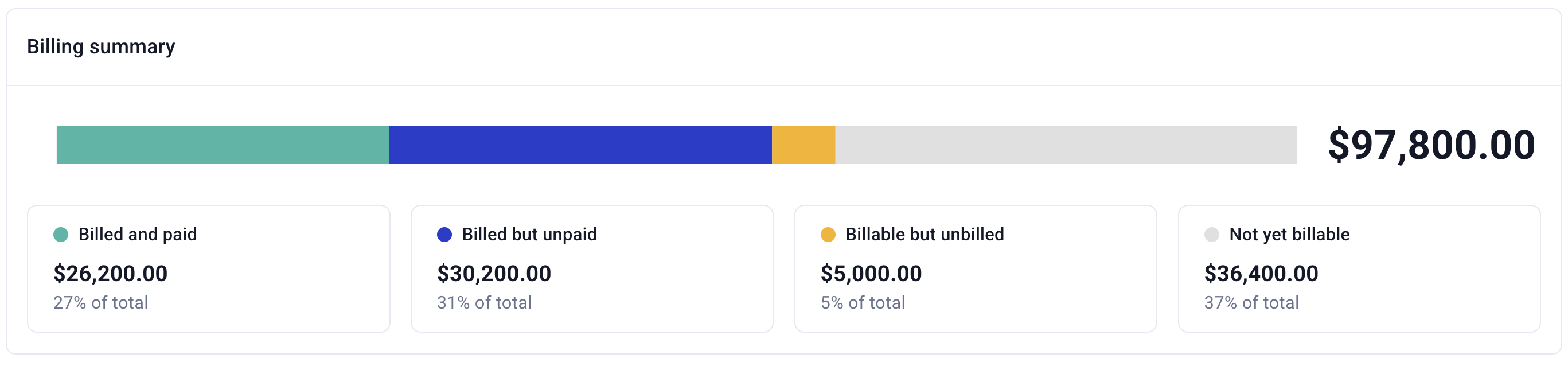
The core **billing summary** for the organization is visible at the top of your projects page:
Billing summary
The billing summary across projects is instantly filterable using the filters available on the project list, including by customer, by project, or by status.
Billing summaries are broken down across four categories:
* **Billed and paid** - total of all billing amounts for periods that have already been billed and have already been paid
* **Billed but unpaid** - total of all billing amounts for periods that have already been billed but have not yet been marked paid
* **Billable but unbilled** - total of all billing amounts for periods that have passed (the period date is before today) but have not yet been billed
* **Not yet billable** - total of all billing amounts for periods that have not yet passed (the period date is after today) and have not yet been billed
{% hint style="info" %}
If a line item is *paid* before it is *billed*, it is considered resolved and is included in "billed and paid." If a line item is *billed* before it is *billable*, it is included in "billed but unpaid."
{% endhint %}
## Specific billings
Billings are also reportable for an individual customer on the [customer details page](/set-up-the-basics/companies.md#view-individual-company-details) or an individual project on the [project details page](/run-your-business/projects/manage-project-line-items.md).
## Billing periods report
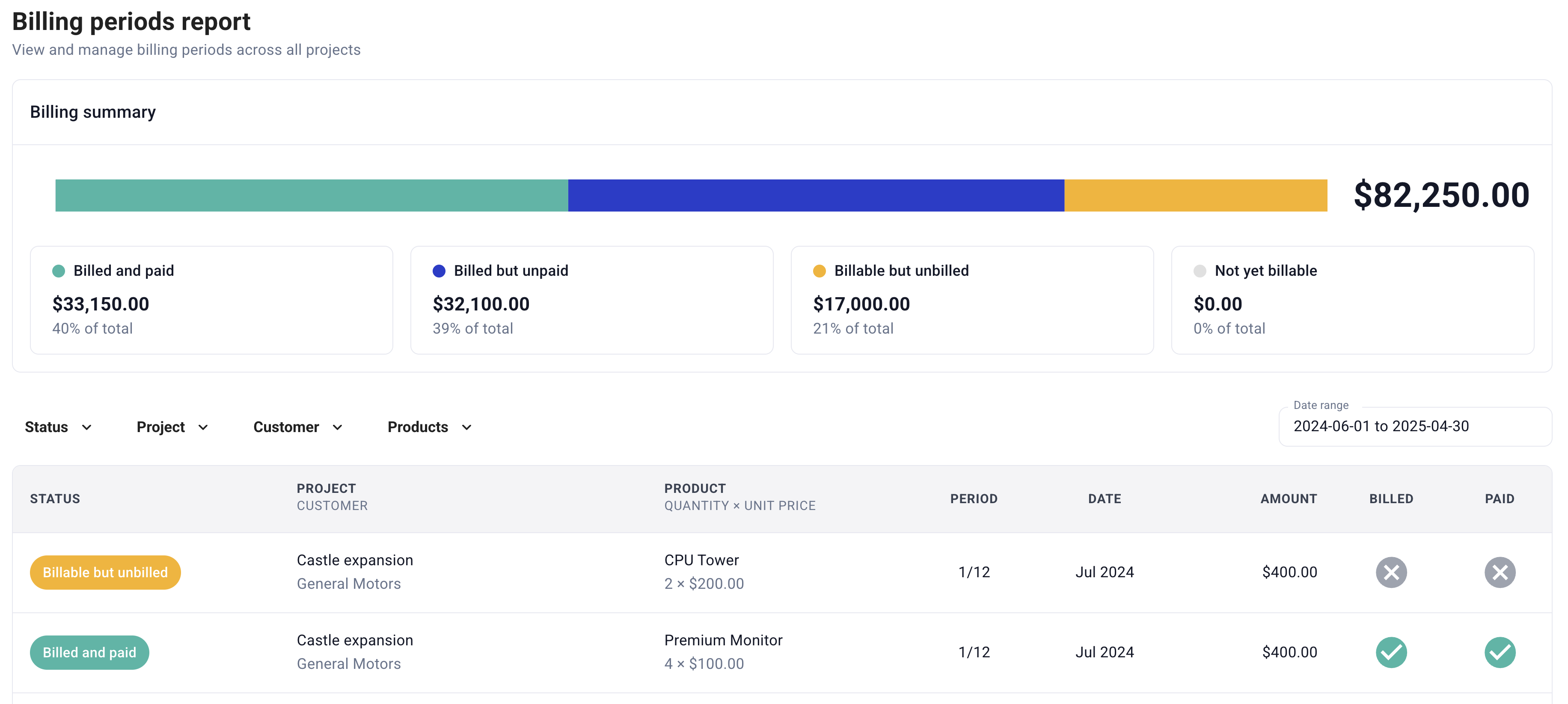
A comprehensive overview of your billing periods and the ability to filter and act on multiple billing periods at once is useful for accounts receivable (A/R) purposes. For (A/R) purposes, billing periods should be viewed and updated through the billing reports interface. This provides a much more robust way to filter and update billing information based on the billing date, customer, project, product, or other aggregate characteristics.
Billing periods report
If you are looking to manage invoices and reconcile payment records from third-party billing or payment systems, you should use the billing reports interface instead of updating product line items individually.
## Exporting billing reports
Export comprehensive billing data for external analysis, accounting integration, and financial reporting. The complete export functionality provides detailed billing information with frequency data and full billing period details.
Billing exports provide a data set including:
* **Billing frequency and schedule details** - Complete billing cycle information and recurring payment schedules
* **Payment status and dates** - Current payment status, due dates, and payment history
* **Customer and project information** - Associated customer details and project context
* **Line item breakdowns** - Detailed product and service billing information
{% hint style="success" %}
Use these exports to integrate with external accounting systems, generate custom reports, or perform detailed financial analysis of your billing data.
{% endhint %}